A Payment Request is used to request payment from a Customer for a Sales Order or Invoice. You can also be set up against a Purchase Order or a Purchase Invoice for internal records.
To Access: Login to ERP > Desktop > Accounting > Payment Request
To Request payment
Before creating and using Payment Request, You have to Create Purchase/sales invoice/order.
A Payment Request cannot be created manually, it is created from a Sales/Purchase Order or Invoice.
- Creating Payment Request via Sales Order
- Go to Sales Order
- Select the Order which you want to create payment request
- Navigate Actions button then press payment request
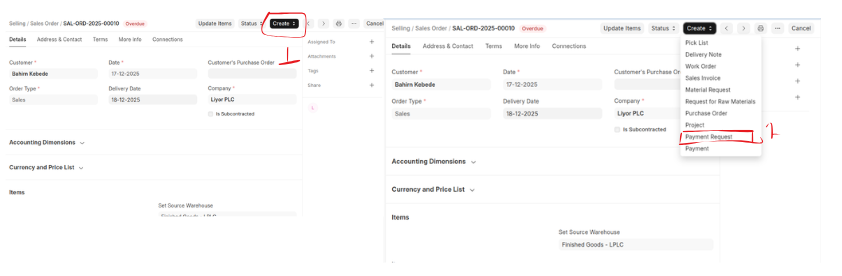
- Once you clicked Payment request the request form will be displayed
- Review then click Save then submit
- Creating Payment Request via Sales Invoice
- Go to Sales Invoice
- Select the Invoice which you want to create payment request
- Navigate Actions button then press payment request
- Once you clicked Payment request the request form will be displayed
- Review then click Save then submit
- Creating Payment Request via Purchase Order
- Go to Purchase Order
- Select the Order which you want to create payment request
- Navigate Actions button then press payment request
- Once you clicked Payment request the request form will be displayed
- Review then click Save then submit
- Creating Payment Request via Purchase Invoice
- Go to Purchase Invoice
- Select the Invoice which you want to create payment request
- Navigate Actions button then press payment request
- Once you clicked Payment request the request form will be displayed
- Review then click Save then submit
Last updated 6 months ago
Was this helpful?