An Operation refers to any manufacturing operation performed on the raw materials to process it further in the manufacturing path. It stores a single manufacturing operation, its description, the Default Workstation, Sub operation for the Operation.
To Access:
Login to ERP > Desktop > Manufacturing > Operation
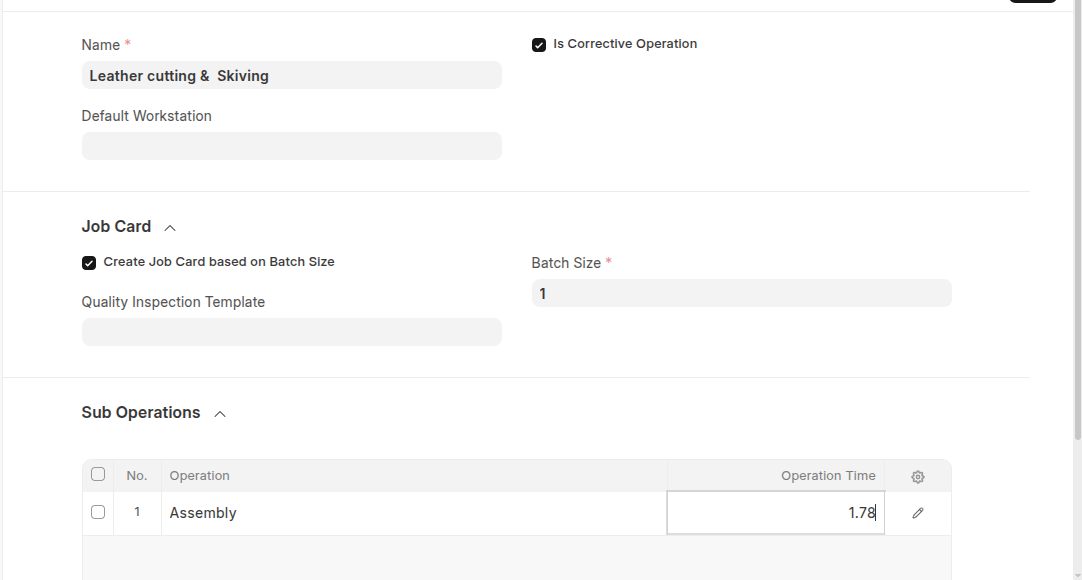
Create Operation
- Go to Operation
- Click Add Operation
- Set Operation Name
- Select the Is Corrective Operation checkbox if you want a provision to track corrective operation.
- Under Job card section enable Create Job Card based on Batch Size then set Batch size and also you can select quanlity inspection template
- If this operation have sub operations list all sub operation in the sub operations section.
- Click Save
Last updated 6 months ago
Was this helpful?