An Accounting Period defines a time period in which financial statements are recorded. It can be used to limit the time period within which transactions can be submitted to preserve the integrity of the corresponding reports.
To Access Accounting Period
Login to ERP > Desktop > Accounting > Accounting Period
Create Acocunting Period
- Go to Accounting Period
- Click Add Accouning Period
- Set Period Name and Select Company
- Select start date and end date
- Add or remove transactions from the closed document table. Note that all transactions listed in the table with Closed option checked will be restricted after the accounting period ends.
- Save and Submit
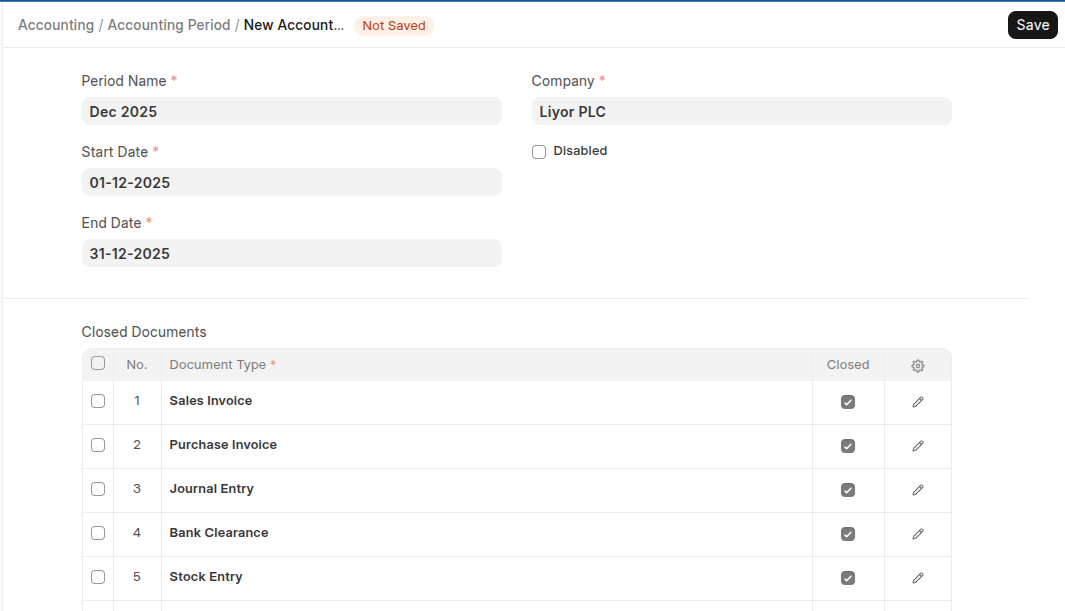
The "Closed" option in the child table for transaction document is used to select which of them are to be restricted after the end of the Accounting Period.
Last updated 6 months ago
Was this helpful?