An Asset Category classifies different assets of a Company. In Asset Category, you can set default a depreciation method, periodicity and depreciation related accounts, which will apply to all the assets under the category.
TO Access Asset Category:
Login to ERP > Desktop > Assets > Asset Category
Create Asset Category
- Go to Asset Category
- Click Add Asset Category
- Set Asset Category Name
- Under Accounts table set fixed asset account and other accounts as needed.
- Click Save
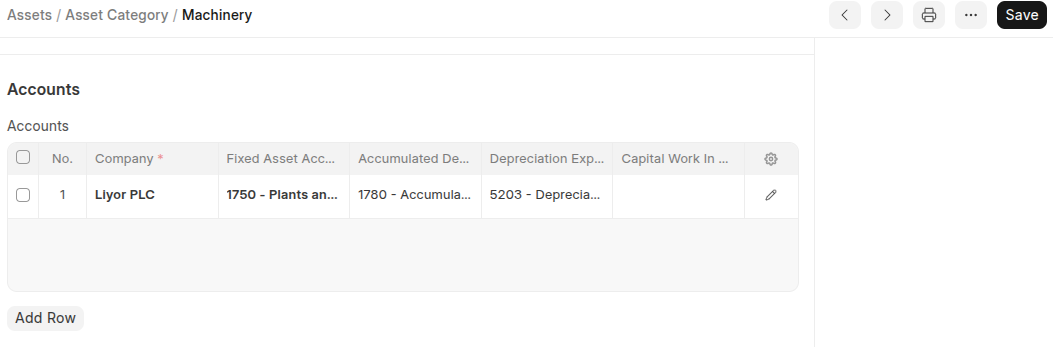 Addition features:
On the Depreciation Options:
- Enable Capital Work in Progress Accounting: On enabling this, accounting entry for assets under this category which are not in use are posted in the Capital Work in Progress accounts. This happens when you own the Asset but it isn't being used yet.
- Non Depreciable Category: On enabling this, Depreciation-related account fields are not required.

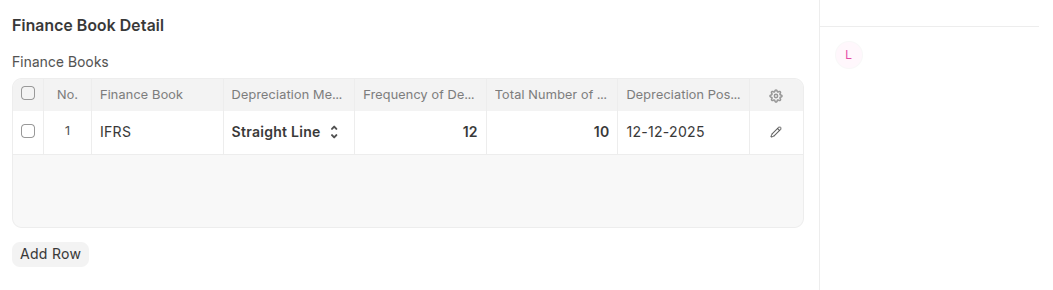
On the Finance Book details: you can set depreciation calculation method by using filled all required fields on the Finance Books table.
Last updated 6 months ago
Was this helpful?