A Job Opening represents a vacancy in your company. It helps you plan and manage recruitment by recording open positions based on approved staffing requirements.
Frappe HR allows you to plan recruitments for your company. The number of Job Openings you can create for a Designation is restricted according to the vacancies planned in the Staffing Plan defined for the company or its parent group companies.
To access Job Opening, go to:
Login > Desktop > Recruitment > Job Opening
Create a Job Opening
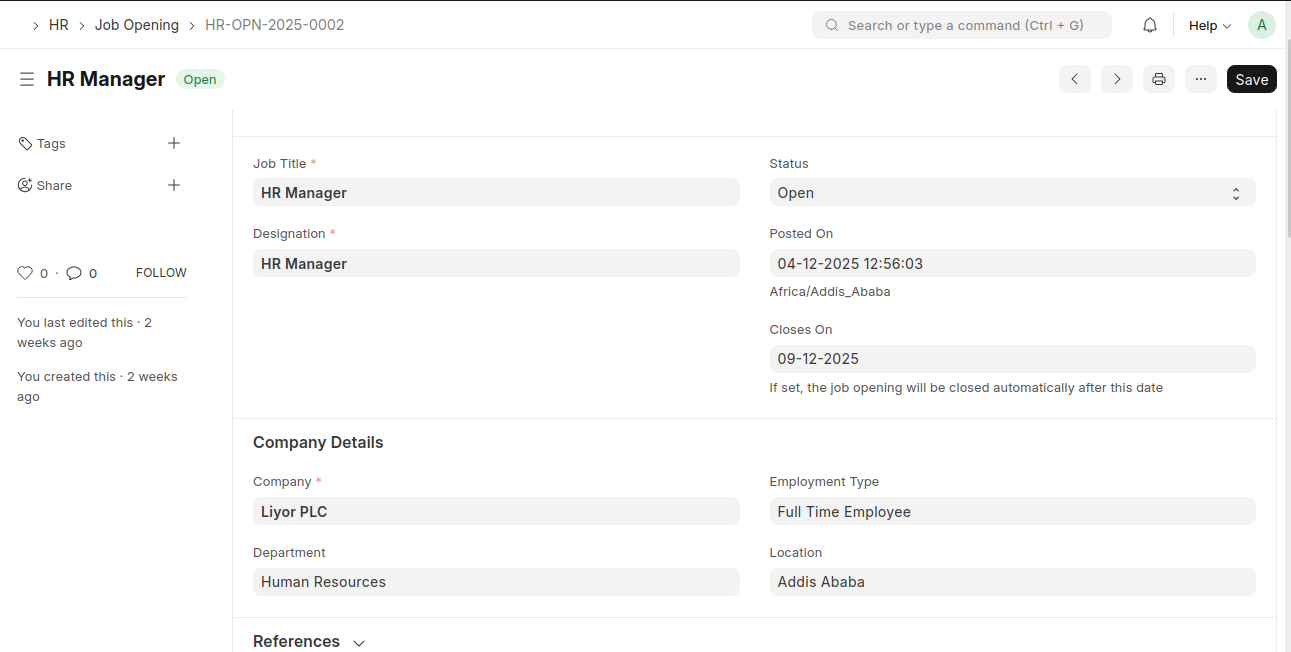
- Click Add Job Opening.
- Enter the Job Title.
- Select the Designation.
- Set the Status (Open or Closed).
- Verify the Posted On date and timezone.
- (Optional) Set the Closes On date to automatically close the opening.
- Select the Company.
- (Optional) Enter Department, Employment Type, and Location.
- Enable Publish on website if the vacancy should be visible publicly.
- Click Save.
Last updated 6 months ago
Was this helpful?