A Material Request is a simple document identifying a requirement of a set of Items (products or services) for a particular reason. A Material Request can have the following purposes:
- Purchase: If the material being requested is to be purchased.
- Material Transfer: If the material being requested is to be shifted from one Warehouse to another.
- Material Issue: If the material being requested is to be Issued for some purpose like manufacturing.
- Manufacture: If the material being requested is to be produced.
- Subcontracting: If the material being requested is to be subcontracted to a vendor.
- Customer Provided: If the material being requested is to be provided by Customer.
To Access:
Login to ERP > Desktop > Stock > Material Request
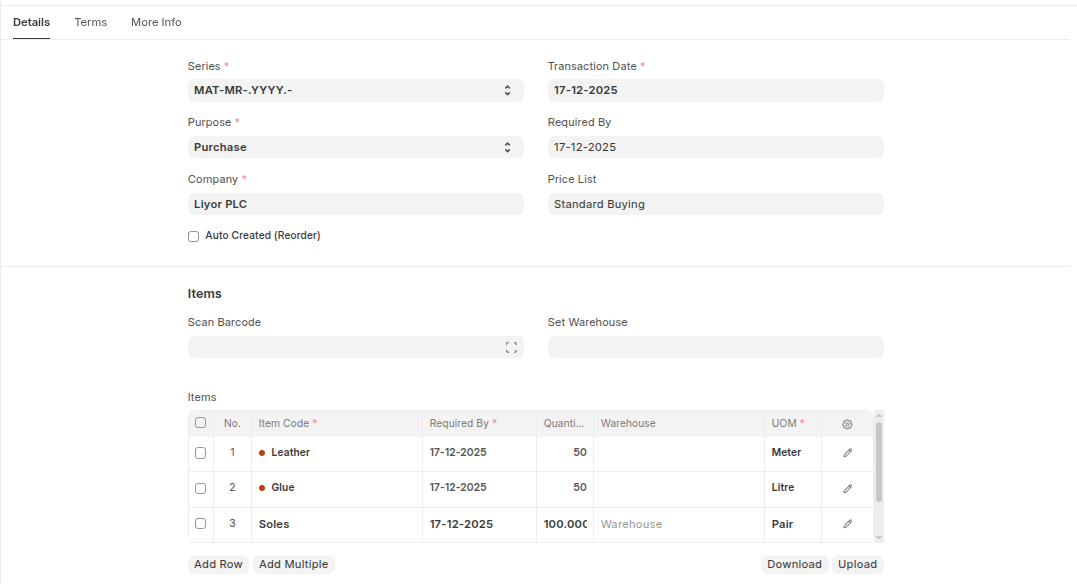
Create Material Request
- Go to Material Request
- Click Add Material Request
- Select Purpose
- Set Set required date
- Under Items table click Add row to list items then set quantities warehouse.
- Click Save
 Statuses
These are the statuses a Material Request can be in:
Statuses
These are the statuses a Material Request can be in:
- Draft: A draft is saved but yet to be submitted to the system.
- Submitted: Document is submitted to the system.
- Stopped: If no more materials are needed the Material Request can be stopped.
- Canceled: The materials are not needed at all and the request is canceled.
- Pending: The Purchase/Manufacture is pending to complete the Material Request.
- Partially Ordered: Purchase Orders for some Items from the Material Request are made and some are pending.
- Ordered: All Items in the Material Request are ordered via Purchase Orders.
- Issued: The materials are issued using a Material Issue Stock Entry.
- Transferred: The required materials are transferred from one Warehouse to another using a Stock Entry.
- Received: The materials were ordered and have been received at your Warehouse using a Purchase Receipt.
Last updated 6 months ago
Was this helpful?