The Leave Application module is used by employees to apply for leave for a specific time period. Leave Applications can be approved or rejected by the assigned Leave Approvers.
To Access Leave Application:
Login > Desktop > Human Resources > Leaves > Leave Application
Leave Application List View
The Leave Application list view displays all leave applications in the system.
Actions
- Click Add Leave Application to apply for leave
- Click a leave application to view or update its status
New Leave Application
Click Add Leave Application to open the New Leave Application form.
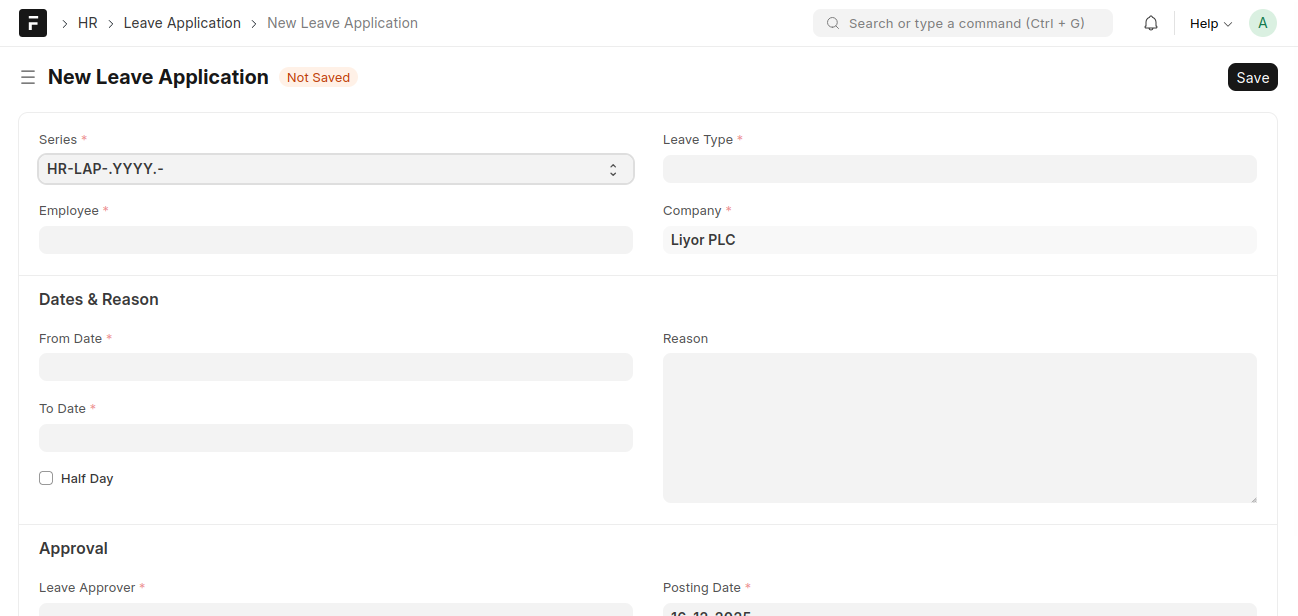
Overview
Used to apply for leave and submit it for approval.
Basic Details
- Series: Auto-generated leave application ID
- Employee: Employee applying for leave
- Leave Type: Type of leave
- Company: Employee’s company
Dates & Reason
- From Date: Start date of leave
- To Date: End date of leave
- Half Day: Enable if leave is for half a day
- Reason: Reason for leave
Approval
- Leave Approver: Person responsible for approving the leave
Saving Leave Application
- Fill in leave details
- Submit the application
- Leave Approver approves or rejects
Last updated 6 months ago
Was this helpful?