#Naming Series and Price Defaults
To Access:
Login to ERP > Desktop > Buying > Buying Settings
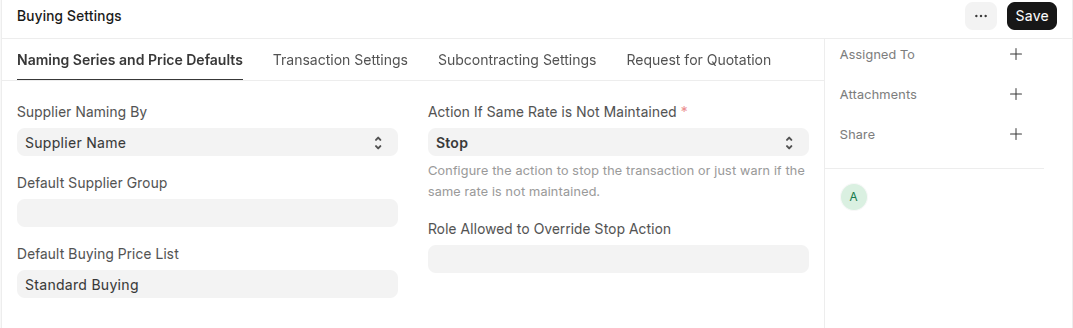
Supplier Naming By
When a Supplier is saved, system generates a unique identity or name for that Supplier which can be used to refer the Supplier in various Buying transactions.
Default Supplier Group
Configure what should be the default value of Supplier Group when creating a new Supplier.
Default Buying Price List
Configure what should be the default Price List when creating a new Buying transaction, the default is set as 'Standard Buying'. Item prices will be fetched from this Price List.
Action if Same Rate is Not Mentioned
It defines the action the should take when it encounters a purchase order, material request, or any other buying transaction where the same rate of an item is not mentioned.
Role Allowed to Override Stop Action
This setting specifies which user roles have the permission to override the "Stop" action in the buying transaction due to discrepancy in the rate.
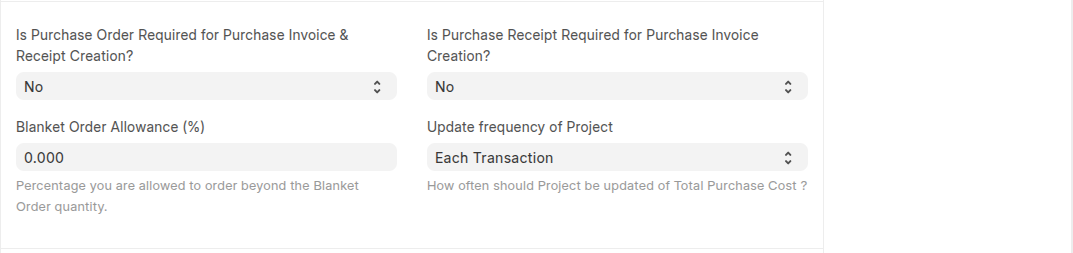
 Is Purchase Order Required for Purchase Invoice & Receipt Creation?
If this option is configured "Yes", ERPNext will prevent you from creating a Purchase Invoice or a Purchase Receipt directly without creating a Purchase Order first.
Is Purchase Receipt Required for Purchase Invoice Creation?
If this option is configured "Yes", ERPNext will prevent you from creating a Purchase Invoice without creating a Purchase Receipt first.
Blanket Order Allowance (%)
You can set the percentage you are allowed to order more against the Blanket Order Quantity.
Update frequency of Project
It indicates how often should Project be updated of Total Purchase Cost.
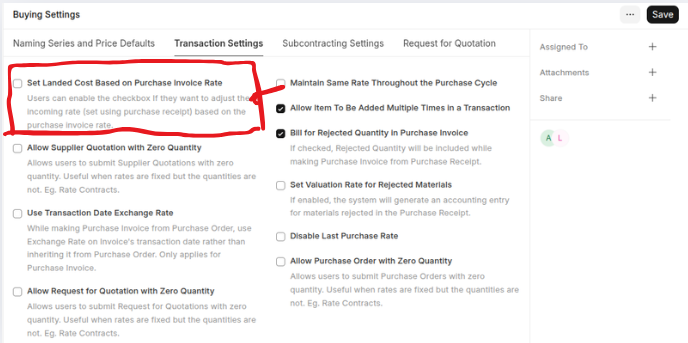
Transaction Settings
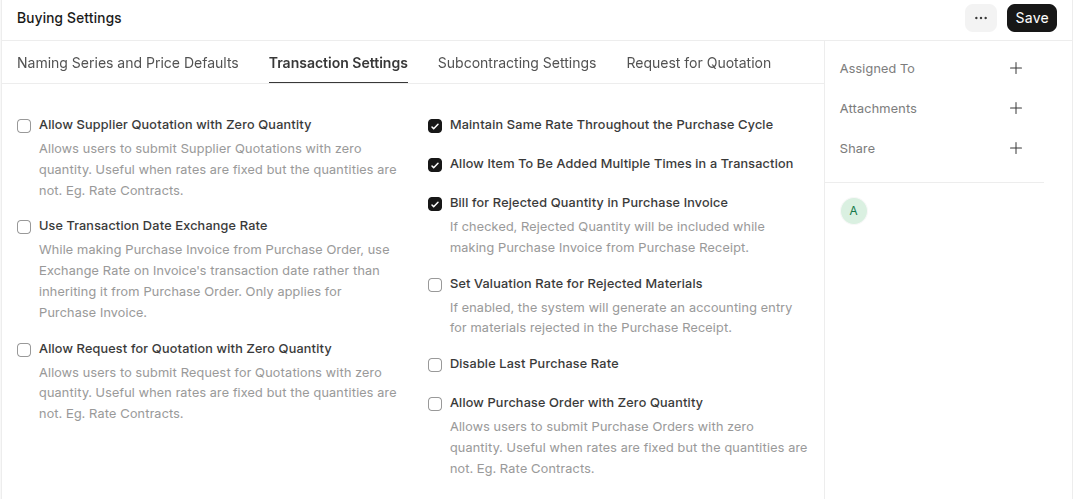
Allow Supplier Quotation with Zero Quantity
If Enabled users can submit Supplier Quotations with zero quantity.
Use Transaction Date Exchange Rate
If Enabled use Exchange Rate on Purchase Invoice's transaction date rather than inheriting it from Purchase Order. Only applies for Purchase Invoice.
Allow Request for Quotation with Zero Quantity
Allows users to submit Request for Quotations with zero quantity.
Allow Item to be added multiple times in a transaction
When this checkbox is unchecked, an item cannot be added multiple times in the same Purchase Order.
Bill for Rejected Quantity in Purchase Invoice If checked, Rejected Quantity will be included while making Purchase Invoice from Purchase Receipt.
Set Valuation Rate for Rejected Materials
For rejected materials, the valuation rate is set to zero, and no accounting ledger entry is created for them in the Purchase Receipt. To apply a valuation rate and generate accounting entries for rejected materials, enable the 'Set Valuation Rate for Rejected Materials' option in Buying Settings. This option is only applicable when Bill for Rejected Quantity in Purchase Invoice has enabled in the Buying Settings.
Disable Last Purchase Rate
It prevents the system from automatically using the rate from the last purchase transaction when creating new purchase orders or transactions.
Allow Purchase Order with Zero Quantity
Allows users to submit Purchase Orders with zero quantity.
 Set Landed Cost Based on Purchase Invoice Rate
If the Maintain Same Rate Throughout the Purchase Cycle is disabled then this field shows in the buying settings. If user wants to adjust the product valuation as per the purchase invoice cost then this option needs to be enable.
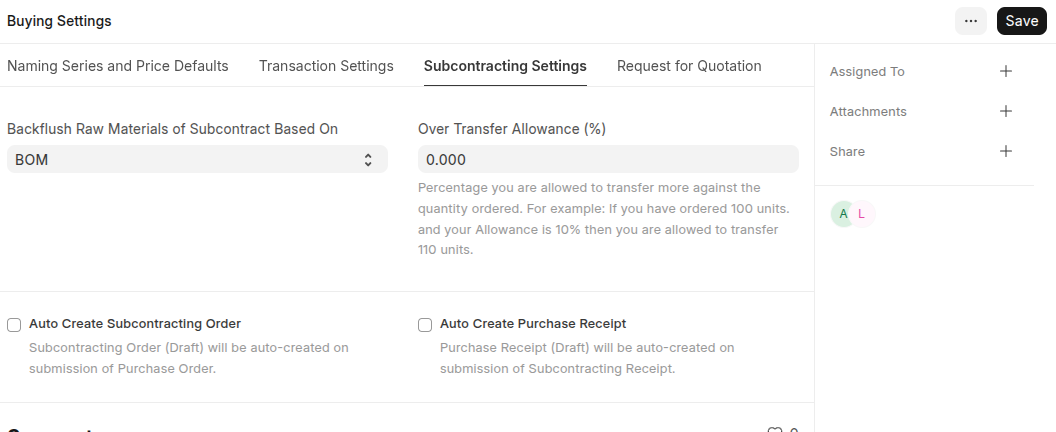
Subcontracting Settings
Backflush Raw Materials of Subcontract Based On
BOM: system will consume raw materials in the subcontracting receipt as per the FG BOM Material Transferred for Subcontract: system will consume raw materials based on the materials transferred against the Subcontracting Order.
Auto Create Subcontracting Order System will auto create the subcontracting order in a Draft state on submission of the purchase order which has "Is Subcontracted" enabled.
Over Transfer Allowance (%)
It is the percentage you are allowed to transfer more against the quantity ordered.
Auto Create Purchase Receipt
System will auto create the purchase receipt for the service items in a Draft state on submission of the subcontracting receipt.
Request for Quotation
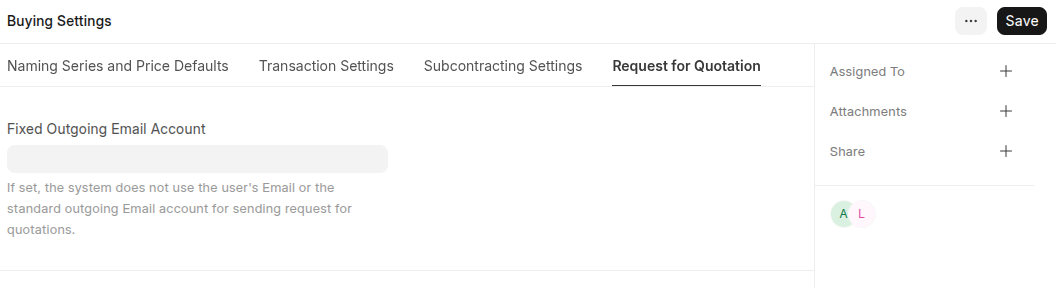
Fixed Outgoing Email Account
If set, the system does not use the user's Email or the standard outgoing Email account for sending request for quotations.